Know which Stripe customers need you.
Spot failed payments, overdue invoices, and expiring cards. Know who to contact, right inside Stripe.
 Stripe App · Free
Free · No sign-up · Read-only
Questions or ideas? support@payervitals.com
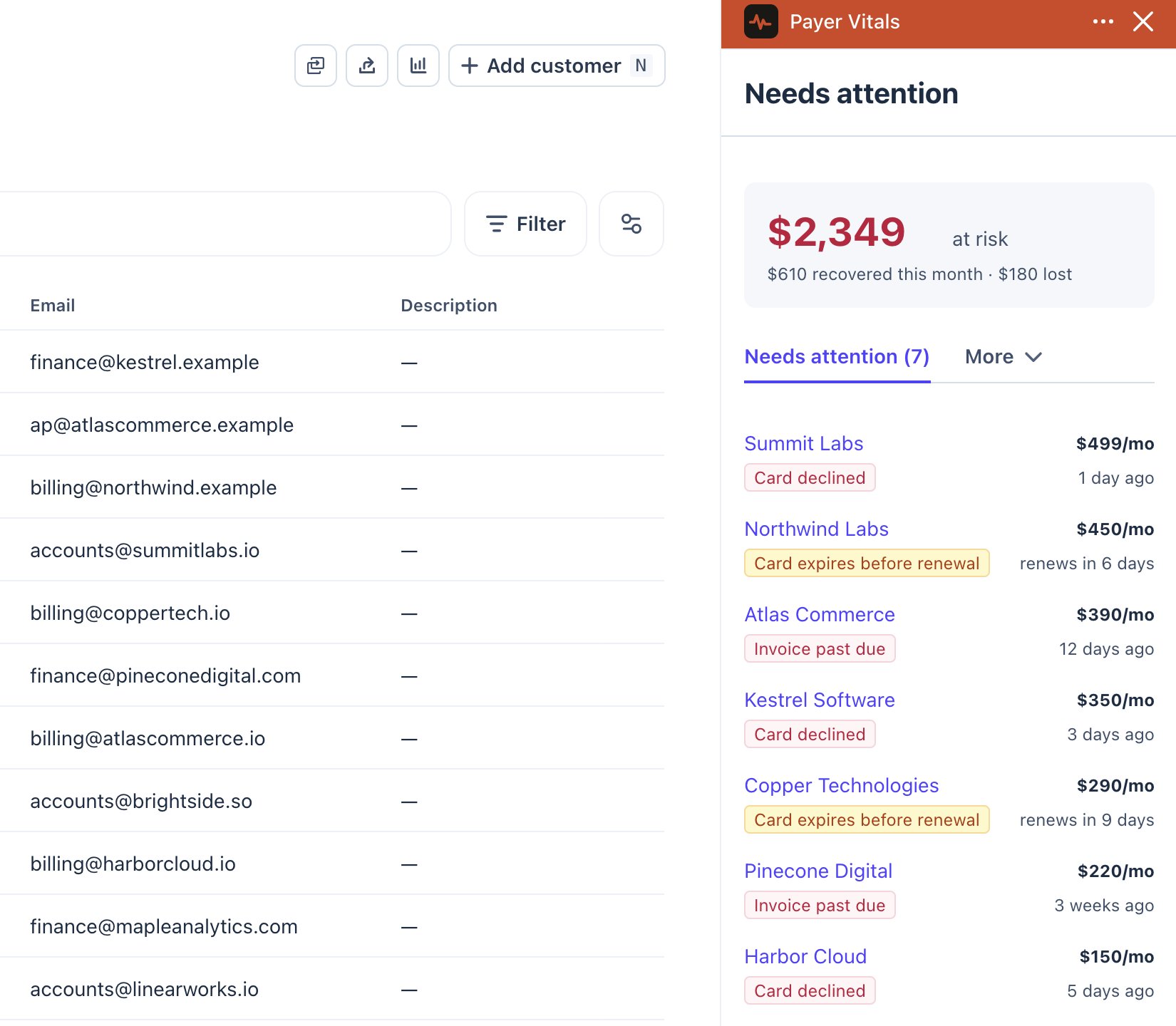
Money you haven't lost yet
A card that expires in three weeks is still recoverable. You just have to know about it.
See what came back
What got stuck this month, what you recovered, and what was lost. One line, at the top of the list.
No second dashboard
Nothing new to remember to open. It appears on the Stripe page you were already on.
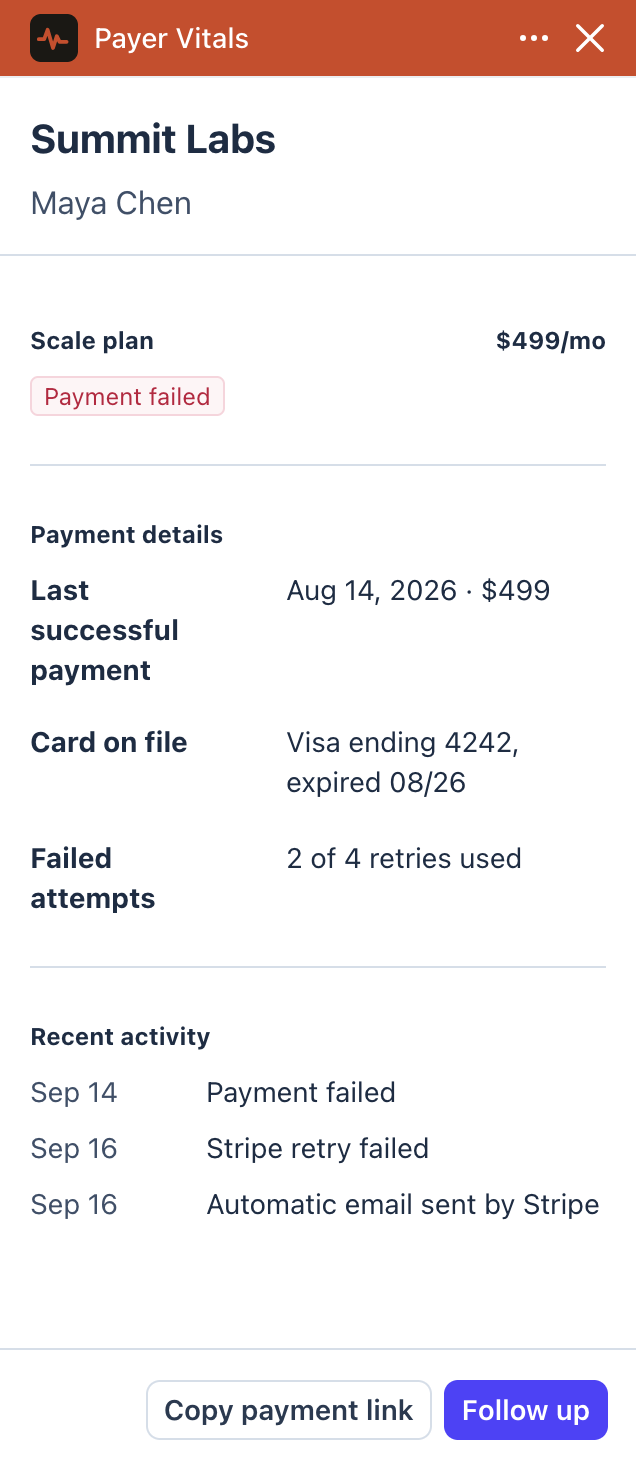
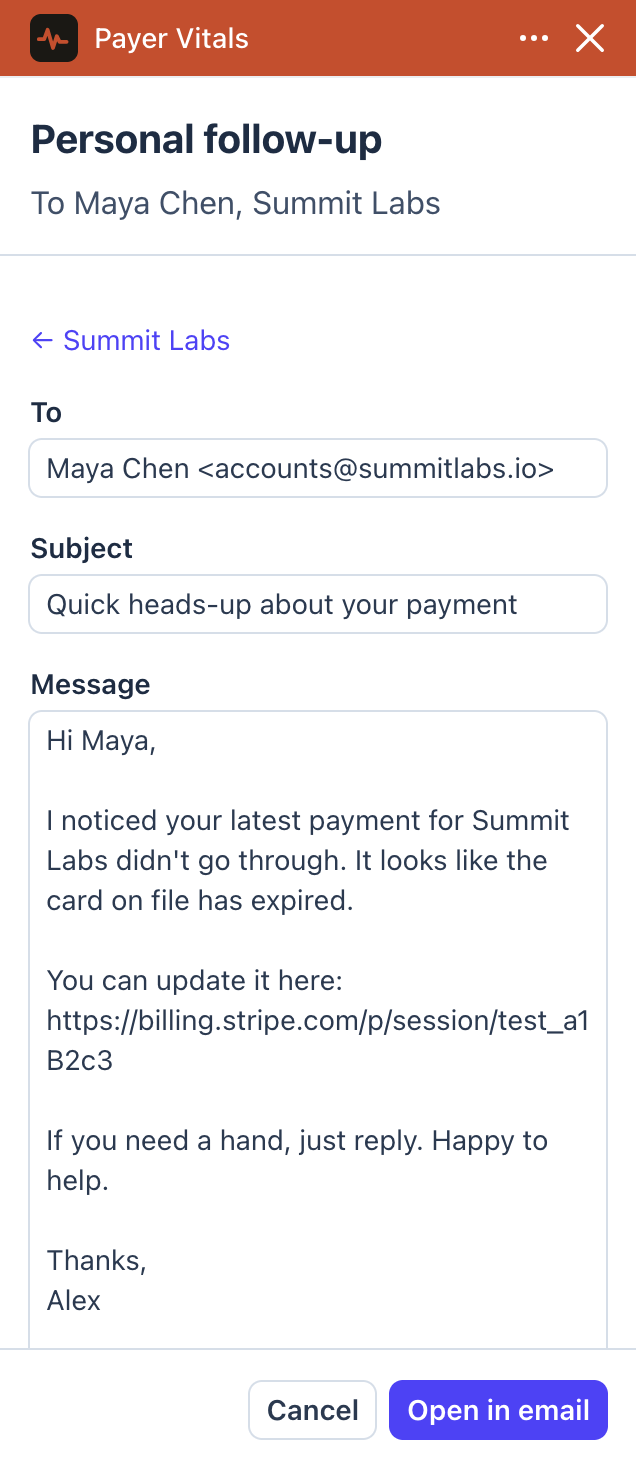
The list says who. The customer page says what to do.
- 01
See why they are on the list
Open a customer and the panel sits beside their details: what failed, what Stripe already tried, and the card that caused it.
- 02
Follow up in one click
Payer Vitals drafts a short note with a Stripe link to update their card. It opens in your own email app, so it comes from you, not from another automated reminder.
These screens run inside Stripe with sample data. The free version shows the list and the reasons. The follow-up and recovered totals are planned for later.
How it works
- 01
Find it in the Stripe App Marketplace
Inside your own Stripe Dashboard, under Apps, the same place you add any other Stripe app. Nothing to download, no browser extension, no third-party site to sign into first.
- 02
Approve what it can read
Stripe shows you the exact permissions before anything happens, and blocks everything else. There is no API key to create or paste.
- 03
It opens beside your customers
The panel appears in the Stripe Dashboard itself, on your customer list and on any customer’s page. You never leave Stripe to use it.
Live on the Stripe App Marketplace, reviewed by Stripe.
Nothing to paste. Nothing to leak.
Payer Vitals installs from inside Stripe and reads through your own Dashboard session.
- There is no API key
- You never create, paste or store one. The app reads through your own Stripe Dashboard session, with the permissions you approve when you install it.
- Read-only, and only these three
- It cannot charge anyone, refund anyone, issue a payout or move money. The full list is on the right, and it is the whole list.
- You revoke it by uninstalling
- Access ends when the app is removed from your Stripe account. Payer Vitals keeps the history it has calculated for you, and deletes it on request.
Stripe shows you this same list when you install, and blocks anything not on it. Payer Vitals never requests write, charge, payout or refund access.
Frequently asked questions
Can I use Payer Vitals today?
Yes. It is live on the Stripe App Marketplace and free. Install it from your Stripe Dashboard and it reads your real customers, subscriptions and invoices.
Do I need to sign up?
No. There is no Payer Vitals account to create, no password and no card. You install it from the Stripe App Marketplace and it works with the Stripe login you already have.
How do I install it?
From the Stripe App Marketplace, inside your own Stripe Dashboard, under Apps. It is the same flow as adding any other Stripe app: Stripe shows you the permissions, you approve them, and the panel appears in your Dashboard. There is nothing to download and no API key to create or paste.
Is this a browser extension?
No. Payer Vitals is a Stripe App, installed from the Stripe App Marketplace and running inside the Stripe Dashboard. It is reviewed by Stripe before it can be listed, and it never touches your browser outside Stripe.
What Stripe permissions does it need?
Read access to customers, subscriptions and invoices, and nothing else. It cannot charge anyone, refund anyone or move money. If a later feature needs another permission, Stripe will ask you to approve it first.
What happens when Stripe redesigns the dashboard?
Payer Vitals uses Stripe’s App SDK and customer detail view. It does not inject a panel into the page or scrape dashboard content. Changes to Stripe’s platform may still require updates.
Is it really free?
Yes. The list of customers who need attention, and the panel on each customer page, are free. No card, no trial that runs out.
Will there be a paid plan?
Maybe later, for things that need more than reading Stripe, like drafting a personal follow-up or keeping a history of what you recovered. If that happens, what is free today stays free.
I need help, or I have an idea. Who do I talk to?
Me, the person who builds it. Write to support@payervitals.com with questions, bugs or suggestions. Every email gets a reply, and most of what comes next will come from what users ask for.